The integration in one view
A closed loop around Taskeen
CDC carries record changes out of Salesforce. Sakneen uses the Salesforce API for the opposite direction: creating the allocation record that Elsewhere will review.
CDC→
Internal→
←CDC
←Salesforce API
Bidirectional entity cycles
Three records, three closed loops
Units, Clients, and EOIs each move in both directions. Salesforce sends source-of-truth changes to Sakneen through CDC; Sakneen sends allocation context back through the Salesforce API.
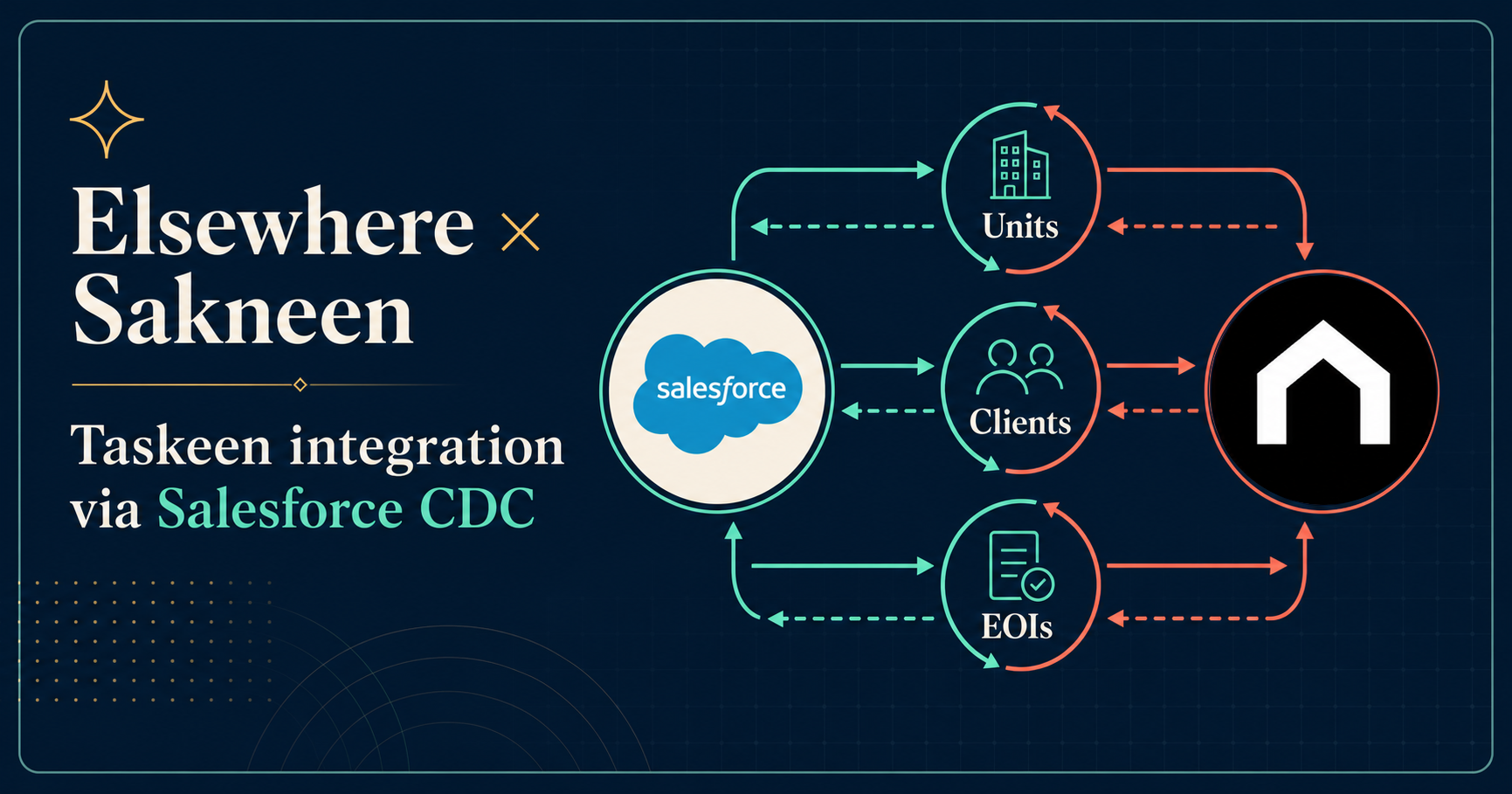
Salesforce and Sakneen exchange Units, Clients, and EOIs through one connected round trip.
CDC Salesforce → SakneenSalesforce API Sakneen → Salesforce
Entity cycle
Units
System of recordElsewhere Salesforce
CDCInventory and status changes
Unit, project, price, availability, and later reservation status updates.
The unit selected by Taskeen, linked EOI, and pending reservation context.
Salesforce APISelected unit and allocation
Allocation platformSakneen Taskeen
Closed loopSalesforce remains authoritative; Taskeen always receives the latest available, reserved, or sold state.
Entity cycle
Clients
System of recordElsewhere Salesforce
CDCCustomer profile changes
The Client, Account, or Contact identity and the agreed ownership fields.
The shared client ID linked to the EOI, selected unit, and allocation result.
Salesforce APIClient allocation context
Allocation platformSakneen Taskeen
Closed loopBoth systems refer to the same customer without making Sakneen a second client master.
Entity cycle
EOIs
System of recordElsewhere Salesforce
CDCEOI and decision changes
New or updated EOIs, allocation readiness, preferences, approval, or rejection.
The allocated unit submitted as a pending reservation, Opportunity, or agreed object.
Salesforce APITaskeen allocation proposal
Allocation platformSakneen Taskeen
Closed loopThe same EOI completes a round trip from demand to allocation to the final Salesforce decision.
Customer lifecycle
Seven simple handoffs
The business flow stays clear even before the final Salesforce object names are agreed.
Salesforce
Salesforce records change
Elsewhere creates or updates inventory, clients, and allocation-ready EOIs in Salesforce.
CDC
CDC publishes the changes
Salesforce Change Data Capture publishes events for the configured objects and fields.
Sakneen API
Sakneen synchronizes the data
Sakneen validates the organization, maps external IDs, and updates its inventory, client, and EOI records.
Taskeen
Taskeen allocates the unit
The Elsewhere operations team reviews EOIs, simulates allocation, adjusts assignments, and publishes the selected scenario in Sakneen Business.
Salesforce API
Sakneen sends the allocation
Sakneen calls Salesforce to create or update the agreed record: an Opportunity, Pending Reservation, or custom allocation object.
Salesforce
Elsewhere makes the decision
The Elsewhere team approves or rejects the reservation in Salesforce and updates the unit state.
CDC
CDC closes the loop
Reservation or Opportunity and Unit change events return to Sakneen, where Business and SaaS show the final result.
Product responsibilities
Who owns what
The vendor integrates with the Sakneen API. Business and SaaS remain user-facing product surfaces.
Elsewhere Salesforce
Owns inventory, client and EOI source data, plus the final reservation decision and authoritative unit status.
Sakneen Business
Runs the Taskeen scenario: review demand, simulate, adjust assignments, publish live, and monitor the integration outcome.
Sakneen SaaS
Shows sales users their EOIs, unit preferences, assigned units, alternatives, and the returned reservation status.
Sakneen API
Consumes CDC, validates and maps records, orchestrates Taskeen, calls Salesforce, and keeps the two systems reconciled.
Information exchange
What moves through CDC
We subscribe only to the Salesforce objects and fields required for this lifecycle.
| Salesforce object | Change we need | Sakneen outcome |
|---|---|---|
| Unit / Inventory | Availability, price, project, launch eligibility | Inventory available to Taskeen |
| Account / Contact / Client | Customer identity and ownership | Client linked to the correct EOI |
| EOI | Ready-for-allocation status and preferences | EOI enters the correct Taskeen launch |
| Opportunity / Reservation | Approved, rejected, expired, or cancelled | Reservation status updated in Sakneen |
| Unit after decision | Reserved, available, blocked, or sold | Both systems show the same unit state |
Sakneen → Salesforce API
Allocation proposal
One versioned record containing the shared allocation ID, EOI, client, project, selected unit, reservation amount when applicable, and a Pending Approval status.
Vendor decisionOpportunityorPending ReservationorCustom Object
Salesforce reference: subscribing to Change Data Capture events
Discovery workshop
What we need from the vendor
These six decisions are enough to turn this lifecycle into the detailed mapping and API specification.
- 01
Salesforce object and field names for Unit, Client, EOI, and the allocation result.
- 02
The EOI status that means Ready for Taskeen allocation.
- 03
Whether Sakneen creates an Opportunity, Pending Reservation, or custom object.
- 04
The approval, rejection, cancellation, and unit-status mappings.
- 05
Stable external IDs for Project, Unit, Client, EOI, Allocation, and Reservation.
- 06
The initial data load, CDC replay ownership, monitoring, and reconciliation process.
Pilot definition of done
One EOI, one allocation, one clear decision
We begin with one Elsewhere project and prove the complete round trip before expanding to more projects or objects.
- A Salesforce unit change appears correctly in Sakneen inventory.
- A Salesforce client and EOI appear in the correct launch without duplicates.
- Taskeen can allocate one eligible unit to the EOI.
- Salesforce receives one pending allocation record with the shared IDs.
- An approval or rejection returns through CDC and updates the reservation and unit in Sakneen.
- Business and SaaS show the same final status as Salesforce.